MIX
Find your vocal’s place.
Compare a clean, articulate treatment with a bolder, more present sound. Compression adapts to the level of your recording.
TWO VOCAL TREATMENTS MADLABSRECORDING STUDIOEnter studio ↗
MADE FOR THE VOICE BEHIND THE MUSIC
From the first take to the final bounce.
A music studio built around the way you create.
01 / A PLACE TO CREATE
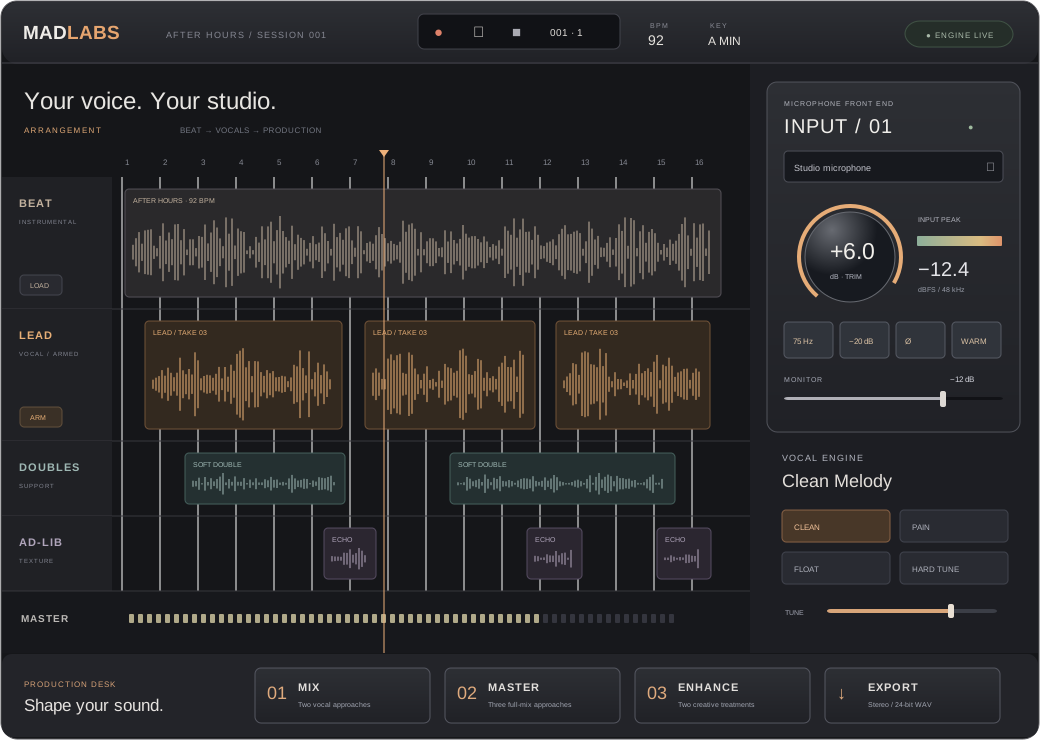
Your beat up top. Your voice right beneath it. Everything you need for a focused recording session, with the deeper controls one click away.
Interface illustration · your meters respond to your actual input.
Choose your input, run a ten-second sound check, and get practical guidance on level and room noise. Shape your signal with a built-in software input strip.
Meet your input console ↗Works with the audio input available to your browser. Analog gain and phantom power stay on your hardware.
02 / FIND YOUR SOUND
Hear a direction before you commit. Compare real processed audio, choose what serves the song, and keep your original take.
Compare a clean, articulate treatment with a bolder, more present sound. Compression adapts to the level of your recording.
TWO VOCAL TREATMENTSThree distinct approaches for the whole arrangement: Modern Hit, Sonic Depth, and the rules-based Mad Brain.
THREE FULL-MIX OPTIONSLift the presence of a vocal or add warmth and a subtle tempo echo. Audition both directions before applying either.
TWO CREATIVE TREATMENTSReal audio processing. RMS-matched previews. Reversible decisions.
03 / STAY IN THE MOMENT
Import a beat and connect your microphone. Record a lead, then build the layers around it.
Explore vocal identities, compare processing options, and return to your original whenever you need.
Save a portable session with your audio inside. Export a stereo, 24-bit WAV of the full arrangement.
A FEW THINGS TO KNOW
Record and layer vocals over a beat, use live vocal effects, compare offline mix and master treatments, save your session, and export WAV audio. It is a focused browser studio. Full MIDI sequencing, comping, plugin hosting, and advanced editing are future work.
This build uses audio DSP and measured signal levels. It does not include a voice-cloning model, synthetic vocal re-performance, or model-generated harmonies. The sound you hear comes from real filters, dynamics, saturation, and effects.
You can use a microphone your browser recognizes. The software input strip helps shape the captured signal; it cannot replace a hardware preamp, supply phantom power, or recover a clipped recording.
Audio is processed locally in your browser. Use Save to download a .madlabs session with the audio included. Reloading or closing the page clears unsaved work. There is no cloud storage or automatic backup in this version.
Use a current desktop browser with Web Audio support. Open the studio over localhost or HTTPS, grant microphone permission when you’re ready, and use headphones for live monitoring. Start with short sessions; this build supports audio renders up to ten minutes.
THE NEXT GREAT TAKE IS YOURS.
No sign-up. Just a place to make music.